DigitalSpace Cloud Server Standard, $ 29.95/mo. on Linux/Windows Cloud
Cloud Server Standard has been added on Feb 26, 2026

| 💪 CPU/Cores : | 1 vCPU |
|---|---|
| 🔋 RAM : | 2000 MB |
| 🔌 Hosted domains : | 1 |
| 🆓 free domains : | 0 |
| 📌 Dedicated IPs : | 1 |
| 💳 Payment Methods : | Credit / Debit / Prepaid Cards |
| 🔨 Control Panel : | [In-house] |
| 🔧 Category : | Backup |
| ✍️ Support Options : | EmailHelp DeskPhone / Toll-FreeAvailable 24/7 |
| 🌏 Server Locations : | United States |
| ⚑ Targeting : | US |
| 🚀 Uptime : | 99.9 % |
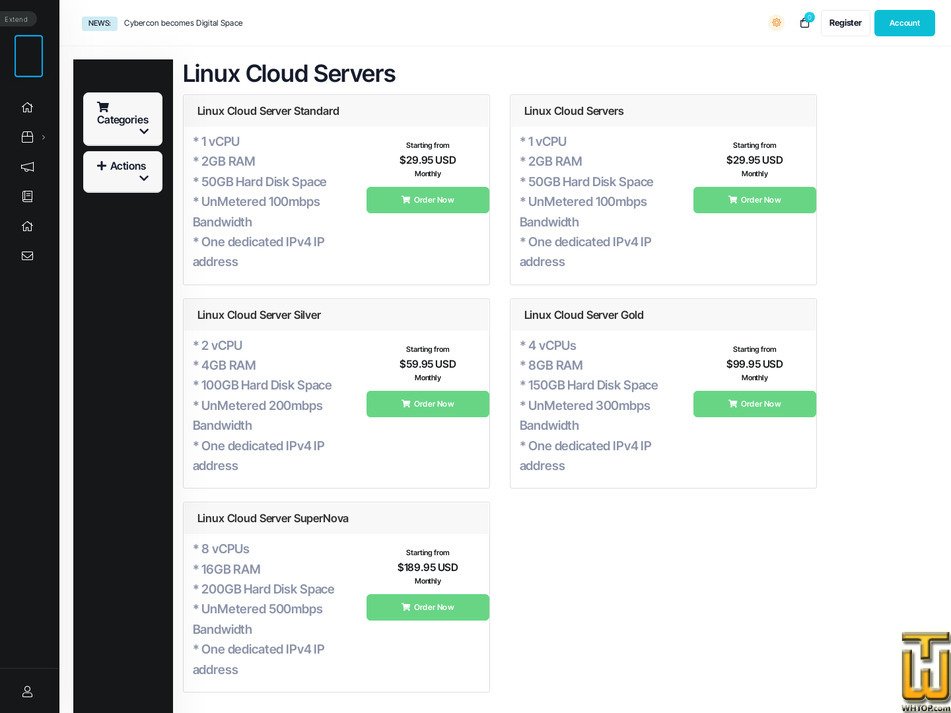
See also initial Cloud Server Standard plan location on their website!
*📜 Plan description
Cloud Server Standard is a fixed-size cloud server tier offered in both Linux and Windows editions.
Resources: 1 vCPU, 2 GB RAM (2000 MB), and 50 GB disk space (50000 MB).
Connectivity: unmetered traffic is tied to a 100 Mbps port speed rather than a monthly transfer cap.
Addressing: 1 dedicated IPv4 address is included.
OS choice and pricing: the Linux edition is 29.95 USD/mo (used as the Plan Price field), while the Windows edition is 39.95 USD/mo for the same size. The OS is typically selected at provisioning, while the resource profile stays the same.
Typical use: small production sites, monitoring nodes, jump hosts, lightweight application services, or staging environments where predictable monthly cost matters.
The cloud server lineup is designed around portal-based lifecycle control, with common actions such as power operations, console access, and resizing handled from the client area. Backups are positioned as a first-class feature, with multiple capture modes (snapshot for live capture, suspend for improved consistency, or stop for the most conservative approach) and full-server restore flows initiated from the portal. The service messaging also references high-availability behavior that can restart a VM that appears down, so controlled shutdown is generally performed through the portal to avoid unintended automatic restarts. Support is presented through phone, email, and helpdesk channels with 24x7 availability, and an uptime target of 99.9% is associated with this virtual server service tier.
Resources: 1 vCPU, 2 GB RAM (2000 MB), and 50 GB disk space (50000 MB).
Connectivity: unmetered traffic is tied to a 100 Mbps port speed rather than a monthly transfer cap.
Addressing: 1 dedicated IPv4 address is included.
OS choice and pricing: the Linux edition is 29.95 USD/mo (used as the Plan Price field), while the Windows edition is 39.95 USD/mo for the same size. The OS is typically selected at provisioning, while the resource profile stays the same.
Typical use: small production sites, monitoring nodes, jump hosts, lightweight application services, or staging environments where predictable monthly cost matters.
The cloud server lineup is designed around portal-based lifecycle control, with common actions such as power operations, console access, and resizing handled from the client area. Backups are positioned as a first-class feature, with multiple capture modes (snapshot for live capture, suspend for improved consistency, or stop for the most conservative approach) and full-server restore flows initiated from the portal. The service messaging also references high-availability behavior that can restart a VM that appears down, so controlled shutdown is generally performed through the portal to avoid unintended automatic restarts. Support is presented through phone, email, and helpdesk channels with 24x7 availability, and an uptime target of 99.9% is associated with this virtual server service tier.
📄 Editorial Review
DigitalSpace (digitalspace.com) is a data-center and infrastructure provider built around colocation, bare metal servers and several layers of virtualized cloud. It is the evolution of the long-running Cybercon platform and now operates under the Digital Space brand, keeping the same technical backbone while aligning with a larger global infrastructure group. The focus is clearly on performance-critical, always-on workloads rather than casual shared hosting.The service catalog is organized in the client portal (your.digitalspace.com) into a few core product families:
- Linux Cloud Servers – KVM-style virtual machines with Standard, Silver, Gold, SuperNova tiers. The entry plan offers 1 vCPU, 2 GB RAM, 50 GB disk, unmetered 100 Mbps bandwidth and one dedicated IPv4 starting around $29.95/month, while the top tier scales to 8 vCPUs, 16 GB RAM, 200 GB disk and unmetered 500 Mbps. These are suitable for typical web stacks, SaaS frontends, APIs and smaller databases.
- Windows Cloud Servers – mirrors the Linux lineup but with Windows licensing baked in. Plans again run from a Standard profile (1 vCPU / 2 GB / 50 GB / unmetered 100 Mbps) up to SuperNova (8 vCPUs / 16 GB / 200 GB / unmetered 500 Mbps), with pricing starting near $39.95/month for Standard and rising to just under $200/month at the top. This line targets .NET applications, RDP-based workloads and Windows-only business software.
- VMware Cloud Servers – for customers who want VMware’s ecosystem instead of "plain" KVM-like virtualization. The same Standard/Silver/Gold/SuperNova pattern appears here, with specs and traffic limits very similar to the cloud plans (up to 8 vCPUs, 16 GB RAM, 200 GB disk and unmetered 500 Mbps). There is also a dedicated virtual firewall add-on for VMware farms, hinting at a more enterprise-oriented use.
- Cloud VPS – essentially a more straightforward VPS line with Standard through SuperNova tiers (again 1→8 vCPUs, 2→16 GB RAM, 50→200 GB disk, unmetered 100→500 Mbps, 1 IPv4). Pricing is slightly lower than the full "Cloud Server" line (entry around $29.95/month), making it attractive for cost-sensitive deployments that still want dedicated resources and unmetered bandwidth.
- Windows Dedicated Blade Servers – physical blade servers hosted in Digital Space’s racks. The Standard configuration starts around $99/month and gives a single Intel Xeon hex-core CPU, 8 GB ECC RAM, 240 GB SSD, hardware RAID, unmetered 100 Mbps, 8 IPv4s, dual NICs and dual power supplies with A+B power. Silver, Gold and SuperNova tiers progressively add more CPU sockets/cores (up to dual 10-core Xeons), larger ECC RAM pools (up to 64 GB) and faster unmetered ports up to 1 Gbps, always including redundant power and multiple 10G network cards. This is clearly aimed at heavier workloads—databases, virtualization clusters, line-of-business apps—where bare-metal performance and predictable throughput matter.
- Server Colocation – single-server and small-rack colocation in Digital Space’s SOC-2 / Level 2 data-center facility, with options ranging from a single 1–4U device through bundled packages that include blocks of IPv4 addresses and unmetered bandwidth. A typical "SingleServer Colocation" option includes rack space for one 2U server, a 120V power outlet, 8 IPv4s, 100 Mbps port with 50 Mbps premium bandwidth (95th percentile), UPS battery backup, diesel generator, unlimited reboots, SNMP monitoring, 24×7 on-site technical support and 24×7×365 customer access. There are also more generous "Standard / Silver / Gold / SuperNova" bundles with higher IPv4 allocations, more power outlets and larger unmetered ports.
On top of this, the knowledgebase shows that they still operate classic web hosting with cPanel, and that DirectAdmin is supported as a control panel on some Linux cloud configurations. This, together with domain transfer options in the portal, means they can still host traditional websites and email, but the "center of gravity" is clearly on VPS, cloud and colocation rather than cheap shared hosting.
Operationally, they come across as a technically-driven, data-center-first provider: unmetered bandwidth on all server/VPS plans, hardware RAID, ECC memory, A+B power, SOC-2 facility, self-service backup/snapshot tools and the ability to vertically scale cloud servers from the client portal. The environment is more "infrastructure for admins and engineers" than "one-click website builder for beginners", which is precisely what many serious hosting buyers are looking for.
📉 Similar hosting plans from other companies in the same category & country location ≡
- Host Armada
 🏆 Alexa Rating41,124 ▲👤 User Rating 👉 Total Reviews: 1
🙌 Average Rating: 10 / 10
👍 Good Reviews: 1
👎 Bad Reviews: 0
👈 Official Responses: 0- 💡 Plan: Web Shuttle
- 🔧 Category: Cloud
- 💻 OS Type: Linux
- 💰 Price: $ 29.95/mo.
- 💿 Disk Space: 50 GB
- 📶 Traffic bandwidth: 2 TB
- 💲 Setup Fee: free
- 📅 Added:
- 📆 Updated:
- 🌏 Server in:
- Aggregate Rating (10 out of 10 from 1 reviews)

- Brinkster
 🏆 Alexa Rating372,556 ▲👤 User Rating 👉 Total Reviews: 3
🙌 Average Rating: 4 / 10
👍 Good Reviews: 1
👎 Bad Reviews: 2
👈 Official Responses: 0- 💡 Plan: 1GB
- 🔧 Category: Cloud
- 💻 OS Type: Linux
- 💰 Price: $ 25.56/mo.
- 💿 Disk Space: 40 GB
- 📶 Traffic bandwidth: 200 GB
- 💲 Setup Fee: free
- 📅 Added:
- 📆 Updated:
- 🌏 Server in:
- Aggregate Rating (4 out of 10 from 3 reviews)
Included resources:
- vCPU: 1
- RAM: 1 GB (1000 MB)
- Data disk: 20 GB SSD
- System disk: 20 GB SSD
- Total SSD storage: 40 GB (40000 MB)
- Included outbound data transfer: 200 GB [...] - IO Zoom
 🏆 Alexa Rating189,421 ▲👤 User Rating 👉 Total Reviews: 12
🙌 Average Rating: 8.6 / 10
👍 Good Reviews: 11
👎 Bad Reviews: 1
👈 Official Responses: 0- 💡 Plan: DO 2GB (2 CPU) (Managed Cloud)
- 🔧 Category: Cloud
- 💻 OS Type: Linux
- 💰 Price: $ 30.00/mo.
- 💿 Disk Space: 60 GB
- 📶 Traffic bandwidth: 3 TB
- 💲 Setup Fee: free
- 📅 Added:
- Aggregate Rating (8.6 out of 10 from 12 reviews)

All plans include OS management, monitoring, firewall assistance [...] - Host Runway
 🏆 Alexa Rating3,123,682 ▲👤 User Rating 👉 Total Reviews: 3
🙌 Average Rating: 10 / 10
👍 Good Reviews: 3
👎 Bad Reviews: 0
👈 Official Responses: 0- 💡 Plan: VPS 4
- 🔧 Category: Cloud
- 💻 OS Type: Linux/Windows
- 💰 Price: $ 30.00/mo.
- 💿 Disk Space: 20 GB
- 📶 Traffic bandwidth: 2,500 GB
- 💲 Setup Fee: free
- 📅 Added:
- 🌏 Server in:
- Aggregate Rating (10 out of 10 from 3 reviews)

The public monthly rate is $30 and the plan card shows a 12-month total of $306.00 [...]