Wasabi Pay As You Go, $ 6.99/mo. on Linux Cloud
Pay As You Go has been updated on (added )

75 Arlington Street, Suite 810
Boston , MA 02116 US
☎ Phone 1-844-927-2241 [toll-free]
☎ Phone +1 617-307-7912
📠 Fax +1 617-307-7973
📧 support@w...| 🔌 Hosted domains : | unlimited |
|---|---|
| 🆓 free domains : | 0 |
| 📌 Dedicated IPs : | 0 |
| 💳 Payment Methods : | Credit / Debit / Prepaid Cards |
| 🔨 Control Panel : | [In-house] |
| 🔧 Category : | Backup |
| ✍️ Support Options : | EmailHelp Desk |
| 🌏 Server Locations : | Australia Canada France Germany Italy Japan Netherlands Singapore United Kingdom United States |
| ⚑ Targeting : | US |
| 🚀 Uptime : | 99.9 % |
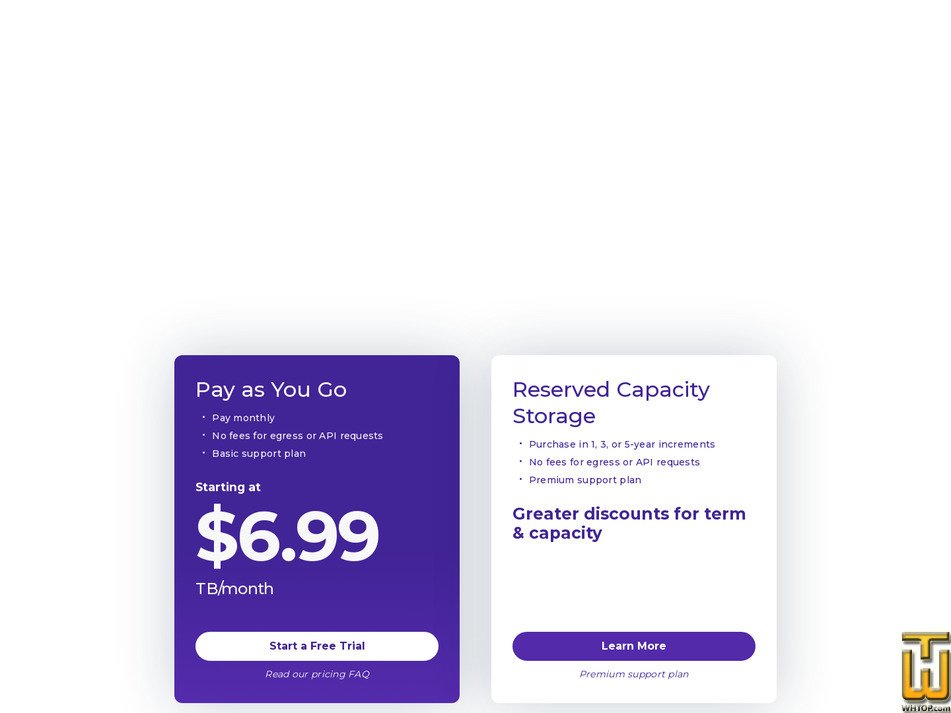
See also initial Pay As You Go plan location on their website!
*📜 Plan description
Pay as You Go is the month-to-month pricing model for Wasabi Hot Cloud Storage, built around a single flat capacity rate instead of complex storage tiers.
Pricing and billing structure:
- Starting price: 6.99 USD per TB per month for object storage capacity.
- Minimum monthly storage charge: even if less than 1 TB is stored, the monthly bill is still charged at the 1 TB minimum.
- Capacity billing is based on time-based usage (active storage over the billing cycle).
- Deletions are not a shortcut to avoid charges: if objects are deleted before the minimum storage duration, a timed deleted storage charge applies for the remaining days.
Data transfer and requests:
- Ingress data transfer is free.
- Egress data transfer is free under the provider's fair-use policy. A good-fit guideline is keeping monthly egress less than or equal to the active storage volume; sustained egress significantly above stored volume may be treated as outside policy.
- API requests are free under the provider's policy.
Support included:
- The plan includes the Basic support plan (business-hours coverage). Support engagement is routed through the support email channel with a ticket-style workflow.
Operational and cost predictability highlights:
- Billing is positioned as capacity-only with no hidden line items for typical egress or request activity.
- The pricing message emphasizes predictable budgeting and the ability to plan storage spend without surprises.
Wasabi Hot Cloud Storage is positioned as simple, predictable cloud object storage with a focus on flat-rate capacity pricing and the avoidance of complicated storage tiers. Data is stored in region-specific buckets so the storage location can be selected based on compliance, latency, or residency needs. Storage regions are available across North America, Europe, and Asia Pacific, enabling multi-region architectures and disaster recovery patterns. Data centers are described as secure and redundant and aligned to common security and compliance expectations. Service availability is supported by an SLA model with service-credit thresholds tied to monthly uptime measurements and planned maintenance notification practices, helping users align storage operations with reliability requirements.
Pricing and billing structure:
- Starting price: 6.99 USD per TB per month for object storage capacity.
- Minimum monthly storage charge: even if less than 1 TB is stored, the monthly bill is still charged at the 1 TB minimum.
- Capacity billing is based on time-based usage (active storage over the billing cycle).
- Deletions are not a shortcut to avoid charges: if objects are deleted before the minimum storage duration, a timed deleted storage charge applies for the remaining days.
Data transfer and requests:
- Ingress data transfer is free.
- Egress data transfer is free under the provider's fair-use policy. A good-fit guideline is keeping monthly egress less than or equal to the active storage volume; sustained egress significantly above stored volume may be treated as outside policy.
- API requests are free under the provider's policy.
Support included:
- The plan includes the Basic support plan (business-hours coverage). Support engagement is routed through the support email channel with a ticket-style workflow.
Operational and cost predictability highlights:
- Billing is positioned as capacity-only with no hidden line items for typical egress or request activity.
- The pricing message emphasizes predictable budgeting and the ability to plan storage spend without surprises.
Wasabi Hot Cloud Storage is positioned as simple, predictable cloud object storage with a focus on flat-rate capacity pricing and the avoidance of complicated storage tiers. Data is stored in region-specific buckets so the storage location can be selected based on compliance, latency, or residency needs. Storage regions are available across North America, Europe, and Asia Pacific, enabling multi-region architectures and disaster recovery patterns. Data centers are described as secure and redundant and aligned to common security and compliance expectations. Service availability is supported by an SLA model with service-credit thresholds tied to monthly uptime measurements and planned maintenance notification practices, helping users align storage operations with reliability requirements.
📄 Editorial Review
Wasabi Technologies is a cloud infrastructure company that focuses almost entirely on object storage, not on classic web hosting or VPS. Headquartered in Boston and founded in 2017 by the creators of Carbonite (David Friend and Jeff Flowers), it has grown into a multi-exabyte platform serving customers in North America, Europe and the Asia-Pacific region. The idea is simple: make cloud storage a fast, reliable utility with predictable pricing, instead of a complex bundle of services and hidden charges.The flagship service is Wasabi Hot Cloud Storage, an S3-compatible object storage platform built around a single "hot" tier. There are no separate cool or archive classes; all data is stored on fast media and remains ready for immediate access. The system is engineered for 11 nines of durability (99.999999999%), with documented availability of 99.9% when using a single region and 99.99% when data is replicated between two regions. This makes it well suited for backups, disaster recovery, long-term archives, analytics data lakes, media libraries and AI workloads where information must stay online rather than being pushed into deep archive.
On top of the core storage, Wasabi offers a few specialized flavors. Wasabi Fire is an all-NVMe, S3-compatible tier tuned for low-latency, high-throughput workloads such as AI/ML pipelines, live analytics, media processing and performance-sensitive web apps. Wasabi Cloud NAS provides a cloud back-end for existing NAS environments, letting organizations offload secondary or archive data while preserving file-based access. Wasabi Surveillance Cloud targets the video surveillance world, allowing VMS platforms and NVRs to push camera footage into the cloud without redesigning the whole system. All of these still sit on the same basic principle: flat storage pricing with no extra fees for egress or API calls.
Management is handled through the Wasabi Management Console, a web interface where users sign up, create buckets, manage access keys and users, browse data and review invoices. For service providers and larger organizations, Wasabi Account Control Manager (WACM) adds a higher-level control plane that can create and manage sub-accounts, allocate capacity, track usage across many tenants and centralize billing.
Crucially, this is not a general-purpose web host. Wasabi does not sell shared hosting, domain names, databases, email services or compute instances. It is a storage layer that typically sits behind backup software, NAS gateways, media platforms or custom applications that already speak the S3 API.
📉 Similar hosting plans from other companies in the same category & country location ≡
- 💡 Plan: OpenVZ SSD Cloud Server
- 🔧 Category: Cloud
- 💻 OS Type: Linux
- 💰 Price: $ 6.95/mo.
- 💿 Disk Space: 10 GB
- 📶 Traffic bandwidth: 1 TB
- 💲 Setup Fee: free
- 📅 Added:
- 🌏 Server in:

Cloud accounts get web console, rebuild, snapshots, 24x7 monitored US facilities, [...]- 💡 Plan: High Performance AMD 1vCPU 1GB
- 🔧 Category: Cloud
- 💻 OS Type: Linux/Windows
- 💰 Price: $ 6.00/mo.
- 💿 Disk Space: 25 GB
- 📶 Traffic bandwidth: 2 TB
- 💲 Setup Fee: free
- 📅 Added:

- 💡 Plan: G-ES
- 🔧 Category: Cloud
- 💻 OS Type: Linux
- 💰 Price: $ 7.66/mo.
- 💿 Disk Space: 15 GB
- 📶 Traffic bandwidth: 1 TB
- 💲 Setup Fee: free
- 📅 Added:

1 vCPU
15 GB SSD
1024 GB traffic
launch price $7.66/mo (30 % off the standard $10.95) for 12 months.
Unlimited apps&domains, free SSL, LiteSpeed stack, one-click backup/restore, [...]- Accu WebHosting
 🏆 Alexa Rating25,385 ▲👤 User Rating 👉 Total Reviews: 49
🙌 Average Rating: 9 / 10
👍 Good Reviews: 48
👎 Bad Reviews: 1
👈 Official Responses: 0- 💡 Plan: GP.1
- 🔧 Category: Cloud
- 💻 OS Type: Linux
- 💰 Price: $ 7.99/mo.
- 💿 Disk Space: 30 GB
- 📶 Traffic bandwidth: 500 TB
- 💲 Setup Fee: free
- 📅 Added:
- 🌏 Server in:
- Aggregate Rating (9 out of 10 from 49 reviews)


